

Hello,
Today I will bring a train tutorial to everyone.
■ Preface
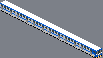
▲ Figure 1.0: A train I drew with a gray background.
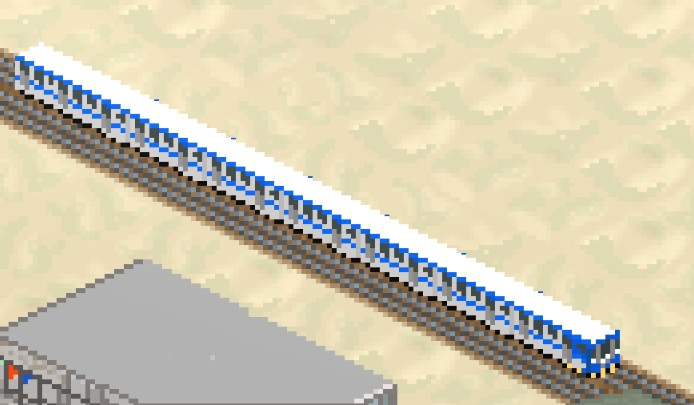
▲ Figure 1.1: the in-game train
First,
trains are based on car system in now version.
So, you should make them into the form of cars.
After that, frames will be needed if you want to make trains.
The examples below shows the specific four directions:

▲ Figure 1.2: A blue white electrical train I drew.

▲ Figure 1.3: the frames index order
■ Frames alignment
Note that the frames directions should be as strict as this index:
north, east, south, west.
Each carriage needs four directions like above to ensure in-game visual performance while turning.
The bottoms of trains should be bottomed in frames like the above frames shows.
It makes sure your trains will not drive too low or high on tracks while they are turning.
Note that the neighbor pixels' distance and size will heavily influence the visual performance of your trains.
■ JSON
As usual,
We use JSON to describe the contents of plugins.
So we need code at least as simple as below one:
Code: Select all
{
    "id": "$EMU_500_mid_1",
    "price":0,
    "type":"car",
    "directional":true,
    "flag train": true,
    "flag normal": false,
    "tram":true,
    "length": 24,
    "frames": [
      { "bmp": "EMU_500_mid_n.png"},
      { "bmp": "EMU_500_mid_e.png"},
      { "bmp": "EMU_500_mid_s.png"},
      { "bmp": "EMU_500_mid_w.png"}
    ],
    "meta": {
    "tags": {
      "short_distance_passenger_train": {}
    }}
  },
  {
    "id": "$EMU_500_tail",
    "price":0,
    "type":"car",
    "directional":true,
    "flag train": true,
    "flag normal": false,
    "tram":true,
    "length": 24,
    "frames": [
      { "bmp": "EMU_500_tail_n.png"},
      { "bmp": "EMU_500_tail_e.png"},
      { "bmp": "EMU_500_tail_s.png"},
      { "bmp": "EMU_500_tail_w.png"}
    ],
    "meta": {
    "tags": {
      "short_distance_passenger_train": {}
    }}
  },
  {
    "id": "$EMU_500_head",
    "title": "EMU500",
    "text": "\nthe blue and white  trains that commonly appear in Taiwan railways.",
    "price":0,
    "capacity":500,
    "type": "car",
    "speed": 1.0,
    "flag train": true,
    "flag normal": false,
    "tram":true,
    "length": 24,
    "frames": [
      { "bmp": "EMU_500_head_n.png"},
      { "bmp": "EMU_500_head_e.png"},
      { "bmp": "EMU_500_head_s.png"},
      { "bmp": "EMU_500_head_w.png"}
    ],
    "tail": [
    "$EMU_500_mid_1","$car_null00",
    "$EMU_500_mid_1","$car_null00",
    "$EMU_500_mid_1","$car_null00",
    "$EMU_500_mid_1","$car_null00",
    "$EMU_500_mid_1","$car_null00",
    "$EMU_500_mid_1","$car_null00",
    "$EMU_500_tail"
],
    "meta": {
    "tags": {
      "short_distance_passenger_train": {}
    }}
  }
]
The most important attributes are these :
Code: Select all
"meta": {
    "tags": {
      "short_distance_passenger_train": {}
    }}
meta tags decide which road system can your trains add and can be selected to which routes.
For example,
I use "short_distance_passenger_train",
This refers to flat-surface railway passenger trains in the game.
Code: Select all
"tail": [
    "$EMU_500_mid_1","$car_null00",
    "$EMU_500_mid_1","$car_null00",
    "$EMU_500_mid_1","$car_null00",
    "$EMU_500_mid_1","$car_null00",
    "$EMU_500_mid_1","$car_null00",
    "$EMU_500_mid_1",
    "$EMU_500_tail"
]
It is only defined in the train head id.
It makes sure the tail id and carriage ids can connect correctly with the head.
So the order is:
["carriages id","carriages id",......,"tail id"]
Then,
You can add "$car_null00"
,an invisible pre-defined car id,
can make sure no gap or overlay for train connections.
Code: Select all
"flag train": true,
"flag normal": false,
"tram":true,
"length": 24,
[code]

"flag train" decides  whether  the  vehicles can drive on tracks.
So,using "flag train true"  and  "flag normal false" can let your trains  only drive on railways rather than roads.
"tram true" make sure it can run on special tram tracks.

“ "length":interger ” is special.
It defines one  train carriage's  horizontal width.
It doesn't  have  to be the same width as real car frames.
But if true,it will be more steady on vision.


Others:
The type of train must be
"car" rather than "train" in the current version.

Each id should be unique from others.


title  and  text   describe  the name  and  introduction of your trains that the game needs.
The title is strictly required because the game uses this to recognize each train or bus in the route system.

For the same reason ,  the price attribute is strictly needed,too.

capacity  defines  how many passengers  can have  for  your trains.

speed decides how fast your trains can run.


[i][color=#808080]
Happy modding mayors!![/color][/i]


